If They Can Do It, So Can I

Back in 2001, the local telephone company in our area (Northern Arkansas Telephone Co) undertook a project whereby each and every telephone pole was identified and mapped using GPS technology.  To accomplish this task, a small group of NATCO employees were equipped with ATVs and GPS units.  After spending each day following the telephone lines and entering each pole as a way point on their GPS units, the team would then upload this information into the NATCO computers, and thus an accurate survey of NATCO’s telephone poles was completed.

When the NATCO ATV showed up on our ranch to survey our poles, I took the opportunity to talk to the technician, and I became intrigued by the notion of mapping out the features of our ranch.  I saw that the equipment that he used was fairly simple stuff, which gave me the necessary impetus to undertake a mapping project of my own.

Back when Retta and I were cruising among the Channel Islands off the California coastline, GPS navigation was a necessity, so I was quite familiar with GPS units and their capabilities.  Our GPS unit was tied in to our laptop computer.  The end result was that we could do our chart work in real-time, with the location of our vessel accurately depicted on our electronic maritime charts.  When we sold the vessel, the GPS unit went with it, but now, here was my excuse to justify the purchase of an inexpensive hand-held GPS unit (I confess to a personal weakness that prompts me to try and find any justification for acquiring new technological gadgets).  So I purchased a Magellan GPS device, and soon had it wired to my laptop computer.  I also needed some type of mapping software, and settled on Delorme 3-D TopoQuads.  This software is fairly full-featured and inexpensive, and while it is accomplishing all that I want it to do, it seems somewhat cumbersome to use, as if it were designed in a prior software era.  Now, all I had to do was tie this all together into a package that could actually be used on the ranch. Here is what eventually evolved from my efforts.
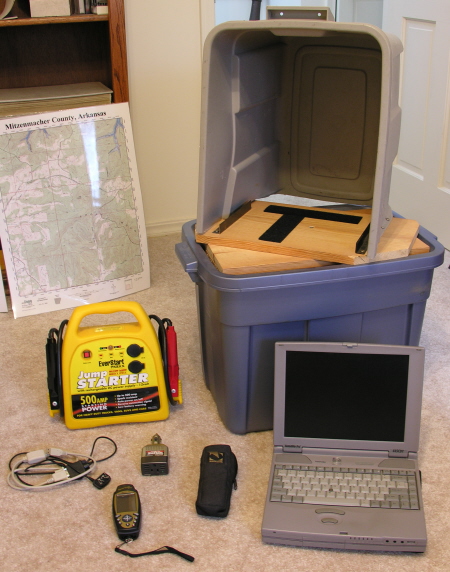
Mapping System Components

Notice the following features of my “super-duper, multi-purpose, portable cartographic data collection machine”  (SDMPPCDCM).

A) High-tech Rubbermaid containers are utilized to house the necessary components, as well as providing sun-shading capabilities for daytime use.  These are inexpensive, readily available, and coincidentally, just the right dimensions to fit snugly into our utility vehicle.

B) This application for a laptop computer consumes lots of power.  The computer cannot use any power saving modes while mapping, the screen must be set for full power to be visible in the daylight, and the hard disk drive and CDrom are always busy performing mapping chores. Rather than trying to create a properly conditioned power supply from the utility vehicle’s electrical system, which would have been a project unto itself, I opted to power the system with an automotive rechargeable booster pack, available (of course) from our local Wal-Mart.  By adding a simple and inexpensive power inverter, this system can be operated at full power for a lot more hours than I care to work in a day.

C) The laptop is affixed to the turntable by a pair of stabilizing rails on the side of the turntable, and secured with industrial Velcro attached to the bottom of the computer.  The turntable swivels on a simple pivot, allowing me to easily adjust the viewing angle.  The entire package is secured to the vehicle with a heavy duty bungee cord.

D) The GPS unit, which feeds data to the computer via a data cable, is mounted on the dashboard of the vehicle with a quick-release mount built especially for this particular GPS unit.  This allows for excellent visibility while driving, and allows me to easily pop off the GPS and use it on foot when necessary.

When mounted in the utility vehicle, the entire contraption appears as below:
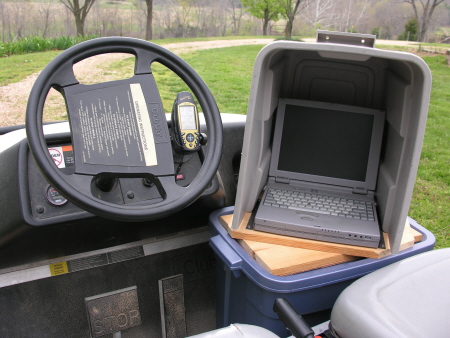
Mapping system in place

An example of the results obtained with this system can be seen in the following map printout, which is a screen shot from the Delorme mapping software.  This particular map layer that is pictured shows the trail network as it exists on the ranch.  There are unlimited layers available, and I have used them for many purposes.
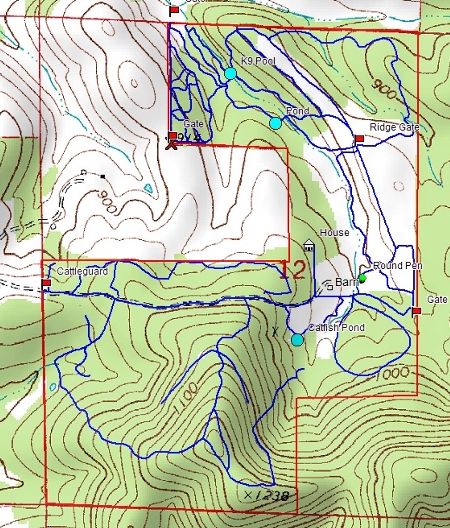
Mapping results

You may ask, “Hal, what prompts you to spend so much time rambling on about computerized mapping systems and such?”   Pablo, editor of the Roundrock Journal, a fine and highly popular Missouri blog, recently mused about solitary shag bark hickory and walnut trees on his property.  The question arose as to weather solitary trees of this type would produce nuts.  I suppose a normal person who is motivated to find an answer to this question would, with a few well-defined queries to Google, come up with an answer in short order.  But I am (thankfully) not normal!

Three years ago, I began a long-term project of mapping the approximately 150 black walnut trees that exist on the ranch.  Each year, I use my GPS data to locate each of these trees, and I note their status as being either “nut-bearing” or not, as the case may be.  I then use this data to plan my bush-hogging schedule, so that the trees are accessible to my friend Jasper when he comes around in the fall to gather our black walnuts.  It is my thought that I can utilize the data that I am collecting to answer the pressing question of solitary nut trees (if I should be fortunate to live long enough to collect a meaningful amount of data).  I am also attempting to see if I can find any direct correlation between nut production and weather patterns.  This may be grist for a future post (if I can find any results worth posting).

DRM Rears Its’ Ugly Head Once Again

I cannot resist ranting about Digital Rights Management (or other copy protection schemes) whenever I run across negative issues associated with them.  When will the holders of intellectual property rights ever learn the basic lessons that seem to arise again and again?

Recently, Sony Music and other music publishers tried to institute a boneheaded copy protection scheme that met with such resounding protests that they immediately backed off on its’ implementation.  This scheme relied on a technique that utilizes what is known as a “root kit” to do its’ duties.  When copying music from these CDs onto your computer, bits of coding would insinuate itself deep into your computers file system.  If you are at all familiar with Unix, Linux, or any of their derivatives, you will recognize that any user that has what is known as “root access” has virtually total control over the machine in question.  Granting root access is thus a potentially dangerous situation.  Root access techniques have become the “method de jour” for modern day hacking, and is a major security issue, particularly as employees shuttle laptops back and forth between home and office networks.  No wonder there was an immediate and loud outcry about this technique (see previous post here).

Today, I ran across this article from cdfreaks.com (I love the monikers you run across on the web)   “Tests find DRM shortens player battery life by up to ~25%” .

Basic lesson that is ignored at the publishers peril – “Do NO HARM unto those who legitimately purchase a license to utilize your intellectual property.”  The revenue stream of any publisher depends entirely on the continued purchases made by these customers.  Cripple them in any way, deprive them of the full use of the media that they have legitimately paid for, and they will abandon you at their very first opportunity.  History proves me right on this issue (although we seem to be in a period where the lessons of history are often ignored).  The pirates who blatantly disregard intellectual property rights always find a way to circumvent copy protection schemes anyhow, so why risk alienating your proven (and hopefully loyal) customer base.  Your financial future depends upon them.

End of rant (for the moment).

Home, Sweet Home

So Pablo inquired “anything new to say?”

Well, I always have something new to say, it’s just that for the past couple of weeks I haven’t had a way to say it.   I just returned from a visit to California, and while away from home, I was “internet challenged”, so to speak.  No mobile computer, no e-mail, no blogs, no nothing!  How ironic – here I was traveling into an area where there is probably as much combined computing power as any other location in the world – and I might just as well have been in the dark ages.  So how did it come to all this?

My first “portable” computer was a Compaq III Portable, a pricey, heavy, luggable computer with a gas-plasma 800X600 amber screen that was considered superb in its’ time.  It allowed my to have access to my software development tools while on site at a clients location.  Being able to make minor programming tweaks and re-compiling .exe’s on site was a tremendous advantage for consultants at that time, and that computer served me well through the duration of my consulting endeavors.

Fast forward to 1996, when Retta and I decided to purchase a Roughwater trawler named Lorelei (photos here) and make her our home.  We were unusual among boat owners, we soon discovered.  We actually used our vessel for what it was intended for – we cruised it among the various islands of Channel Islands National Park religiously. In fact, if the nights we spent at anchor at the Channel Islands were strung together, it would be a span of nearly two years.  We wanted dial-up internet access on board the vessel while at the marina, and I also wanted to run navigational charting software that I could tie into our GPS and radar systems for use while cruising.  We needed a small footprint, so we chose a Toshiba Satellite Pro system that served our needs very well.

When we eventually sold our vessel and began to lead a more conventional lifestyle (if you call retiring to a remote, sparsely populated rural area in the Ozarks conventional), the Toshiba laptop was pretty much relegated to the closet.  While it served us well on board Lorelei, it is, never the less, an old computer running Windows 98SE (barely), running at 133 Mhz and sporting a whopping 1GB hard disk drive.  It would hardly qualify me as a technical road-warrior, so I guess until I can justify the expense of a new laptop, I will probably be banished to the dark ages whenever I hit the road.

Now here is some fun stuff.  If you have not yet been steered over to Yahoo for their collection of Widgets, and you are running at least Windows XP or Windows 2000, you will absolutely love this massive collection of very cool (and free) gadgets called Yahoo! Widgets.  Be careful, as you can burn up a lot of time looking through all of the neat gadgets that are available. 

The Widgets are intuitive and easy to use, as I discovered recently.  I installed a To-Do List widget just before leaving for California.  When I left, I had a few things on the list for my attention when I returned.  By the time I had gotten home, Retta had figured how to use the widget, and the screen was just full of things for me to do!  So I had better be going …uh…now…

P.S. to Cindy – please jump in with comments any time.  Remember, no comments = no fun.