First Impressions of HP Slimline s7320n Media Center PC

First, a caveat – I purchased this machine to use as a workstation in my upstairs digital darkroom, and not to use as a Media Center PC.  My requirements were for an inexpensive computer that would operate my scanners and printers, provide a reasonably fast platform to run Photoshop filters and render mpg2 files, and provide networked connectivity to my Media Center computer in my downstairs office (which is the repository for all my media files).  On all of these counts, this computer seems to fill the bill.  But I don’t think that I would call this a Media Center computer.

This is part of a new generation of Media Center PCs built to Microsoft’s redefinition of minimum Media Center PC hardware requirements.  A Media Center PC, unlike the original specification, no longer has to be equipped with a TV tuner card or IR blaster/remote.  And it is into this category of machine that the HP s7320n falls.

One of the first tasks that I performed after the initial set-up procedures was to import my modest CD library (about 1200 tracks) from the office computer into Windows Media Player library.  I fired up the MCE 10′ interface, and sure enough, my music appeared in My Music, just as it belonged.  I instructed MCE to do the same with my photo and video files stored on the downstairs computer, and MCE found them quickly.

The first major limitation that I experienced involved MCE’s MY TV (or lack thereof).  Because this computer has no TV tuner card, there is no MY TV folder displayed in the MCE 10′ interface.  This presents a problem for me for the following reason.  MY RECORDED TV is a sub-folder of MY TV, and because I can’t access MY TV, I also can’t access MY RECORDED TV.  But I have numerous recorded television programs stored on the downstairs computer that I would like to be able to view upstairs.

I thought that I could run the MCE configuration setup and somehow install the MY TV option onto the MCE home screen, but the configuration utility will not allow that, as it detects that there is no TV tuner card installed.  Oh well, I guess I can’t utilize the MCE 10′ interface for watching my recorded TV upstairs, but at least I can access it directly from the Windows Media Player library.  And it streams my recorded TV across the network flawlessly (so far).

The second major limitation involves the lack of a remote control.  The remote, combined with the MCE 10′ interface is a powerful and easy method of navigating among and within your media files.  Without the remote, what is the point of a 10′ interface (unless you have unusually long arms.  Besides access from a distance, the remote gives you one-button access to MY PICTURES, MY MUSIC, MY VIDEOS, MY TV, MY RADIO, etc.  Without it, one must navigate various layers of menus to get from one function to another. An additional major shortcoming is that the keyboard/mouse controls within the MCE 10′ interface does not allow access to skipping forward or backward within files, as the remote does.

I think it will be worth the modest cost involved to buy an IR receiver and remote for this computer, just to be able to browse media files and watch recorded TV while relaxing from a distance.

HP Pavilion Slimline s7320n PC to the Rescue!

FedEx just arrived with the new Slimline PC that I ordered from HPshopping.com.  Now maybe I would make some headway with my continuing networking problems.  I was quite surprised when the driver handed me such a small carton, and even more surprised to find that the PC inside was tiny!

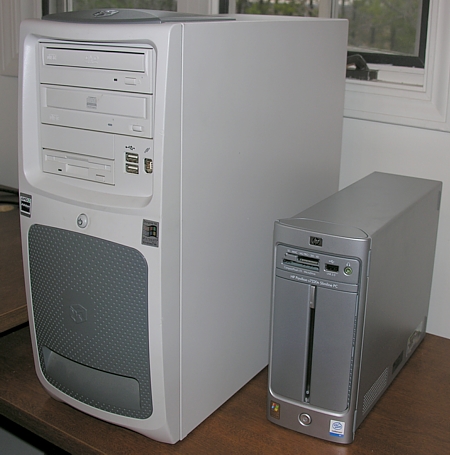
Slimline s7320n vs Conventional Tower Case

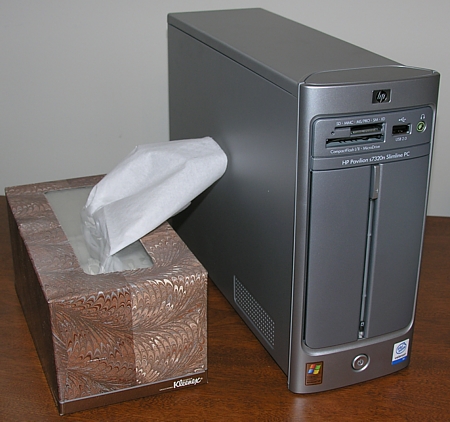
As you can see, the traditional tower that it is replacing is huge by comparison, and the Kleenex box below is nearly the same size as this computer.

Slimline s7320n vs Kleenex box

Initial setup was a breeze – no glitches occurred throughout the entire process – and all of my peripheral equipment installed and ran without a hiccup.

Almost all of it, that is.  My first problem occurred when I attempted to install my new Linksys Wireless G PCI card into the PC.  I knew that this PC had one PCI slot, and that it was occupied by a modem that I didn’t need.  So I thought that I would simply replace the modem with the wireless G card.  Problem is, this PC is so much narrower than a standard PC that the metal back plate on the PCI card was about an inch too long to fit.  A HACKsaw was this technicians tool of choice for this situation!  And it worked.  I was now officially a “computer HACKer” (groan).

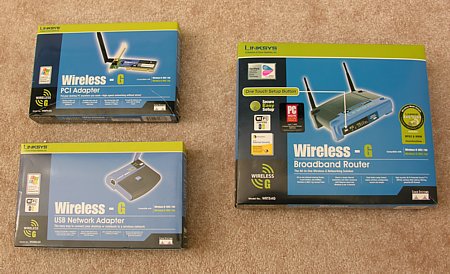
 Linksys Wireless-G components

The next problem occurred with the network equipment that I bought.  You would think that these three items pictured above, from the same manufacturer, bought at the same store at the same time, advertised on their packaging as being compatible with each other, would install fairly easily on two new computer systems both running the latest versions of XP.  Alas, it was not to be.  Without going into the gory details, I had to scrap using the Linksys installation routines and manually install and configure the drivers myself.

Once I was able to configure the adaptors, bind them to the proper protocols, and establish basic connectivity, I proceeded to run the Network setup wizard.  All this did was re-create the exact same problem that I was having with the old computer and OS!  In frustration, I scrapped the wizard and picked up a good book on networking Windows XP computers.  With book in hand, and about sixty thousand trips up and down the stairs, I was finally able to get my network working properly.

Lamberts Cafe in Ozark, Missouri is a Fun Place to Eat

Out in Ozark, Missouri (just south of Springfield) there is a place called Lambert’s Cafe – the only home of “throwed rolls“, that is well worth a visit, if you can manage to make your way over there during off-peak times.  It is a favorite tourist stop for dining on the trip from Springfield to Branson, so the place is quite crowded on weekends and throughout the entire summer season.  If you can’t manage off-peak times, the food and service will still be great, but there will be a long wait to be seated.

As soon as you are seated, you will notice some interesting things.  For one, there is a huge basket of butter and a roll of paper towels at your table.  Grab a paper towel and make it into a place mat in front of you, because withing moments a “roll-guy” will come around, pushing a cart of hot-out-of-oven rolls that are fantastic (especially with all that butter at the table).  The thing is, the roll-guy is more of a pitcher than a waiter – the good ones will toss the rolls to you from 10 yards away, so heads-up!  Soon after, another server will come around and ladle piles of fried okra on your paper towel.  When your beverage comes, you find that it is the size of a tanker-ship.

Your meal will be served in a large 18″ skillet, which is more than any normal person should really eat, but if that weren’t enough food, other servers now start offering to ladle up fried potatoes & onions, black eyed peas, tomatoes & pasta, etc. and of course, more “throwed rolls”.  If you still are hungry ??? then the waiter will gladly offer to bring you more of whatever you ordered – I can’t imaging anyone ever taking them up on the offer, but who knows?

It’s a fun place, well worth trying out.